We are currently working on a new Computing Curriculum.... watch this space!

Computing Prayer
Our Father in heaven,
Grant us the wisdom to use technology in a way that shows love, responsibility and respect.
Teach us to be our best and to lead by example. Help us to use our knowledge and understanding in computing to create a better society for all. May our actions inspire others to use technology responsibly and compassionately.
Lord, we offer our hard work in computing to you. May it be an offering that honours you.
Guide us in using technology as a tool to build bridges, foster understanding, and create a more connected and compassionate world.
In Jesus’ name,
Amen
Psalm
“Do to others as you would like them to do to you.”
Luke 6:31
Computing Curriculum Intent
At St Anne’s R.C. Primary School we want pupils to be masters of technology and not slaves to it. Technology is everywhere and will play a pivotal part in students' lives, therefore, we want to model and educate our pupils on how to use technology positively, responsibly and safely. We want our pupils to be creators not consumers and our broad curriculum encompassing computer science, information technology and digital literacy reflects this. We recognise that the best prevention for a lot of issues we currently see with technology/social media is through education. Building our knowledge in this subject will allow pupils to effectively demonstrate their learning through creative uses of technology. We recognise that technology can allow pupils to share their learning in creative ways. We also understand the accessibility opportunities technology can provide for our pupils. Our knowledge rich curriculum has to be balanced with the opportunity for pupils to apply their knowledge creatively which will in turn help our pupils become skilful computer scientists. We encourage staff to try and embed computing across the whole curriculum to make learning creative and accessible. We want our pupils to be fluent with a range of tools to best express their understanding and hope by Upper Key Stage 2, children have the independence and confidence to choose the best tool to fulfil the task and challenge set by teachers.
Computing Curriculum Overview

Supporting Resources for Computing Curriculum Implementation
We use Purple Mash, Internet Legends and an external provider to support the implementation of our Computing Curriculum.

Internet Legends
To make the most of the internet, children need to make smart decisions. Be Internet Legends empowers younger children to use the web safely and wisely, so they can be confident explorers of the online world. For more information please click on the picture link.

From coding to email and online safety, Purple Mash includes everything you need to deliver the Computing curriculum, all in one place!

Computing Curriculum
Please click the link below to access the content of the National Curriculum by subject and by year group.
 |
The National Curriculum KS1 and KS2 Computing Programme |

Computing School Learning Zone Resources
Please use the links below to access our learning resources.
|
KS1 Computing Learning Resources |
|
KS2 Computing Learning Resources |
|
KS1 E-Safety Learning Resources |
|
KS2 E-Safety Learning Resources |

Pslam
I will say to the Lord,
“You are my place of safety and protection. You are my God and I trust you”
Psalm 91:2
Intent
At St Anne’s RC Primary School, we recognise that our children are growing up in an increasingly complex digital world and although this can provide many exciting opportunities this can also present many risks and challenges. Our mission of ‘Growing together in God’s Love’ underpins all our curriculum and we are committed to the education of the whole child through a broad and balanced curriculum however we recognise that in education today, keeping safe online is crucial to safeguard our children. At St Anne’s we ensure that the teaching of online safety is appropriate to the age and stage of development of the children. We aim to equip pupils with the skills and knowledge to use technology appropriately, responsibly and respectfully. We teach children how to recognise the risks associated with technology and how to deal with them, both within and outside of the school environment. At St Anne’s our online safety curriculum promotes the British Values of Democracy, Rule of Law, Individual Liberty, Mutual Respect and Tolerance of those of different faiths and beliefs. Our PSHE/RSHE curriculum ensures coverage of the statutory RSHE DFE guidance however at St Anne’s we believe we need to give our children ample opportunities to explore certain strands of this document in greater detail. At St Anne’s we believe it is important to include parents and carers in their child’s education of online safety as they are the first educators of their child.
Implementation
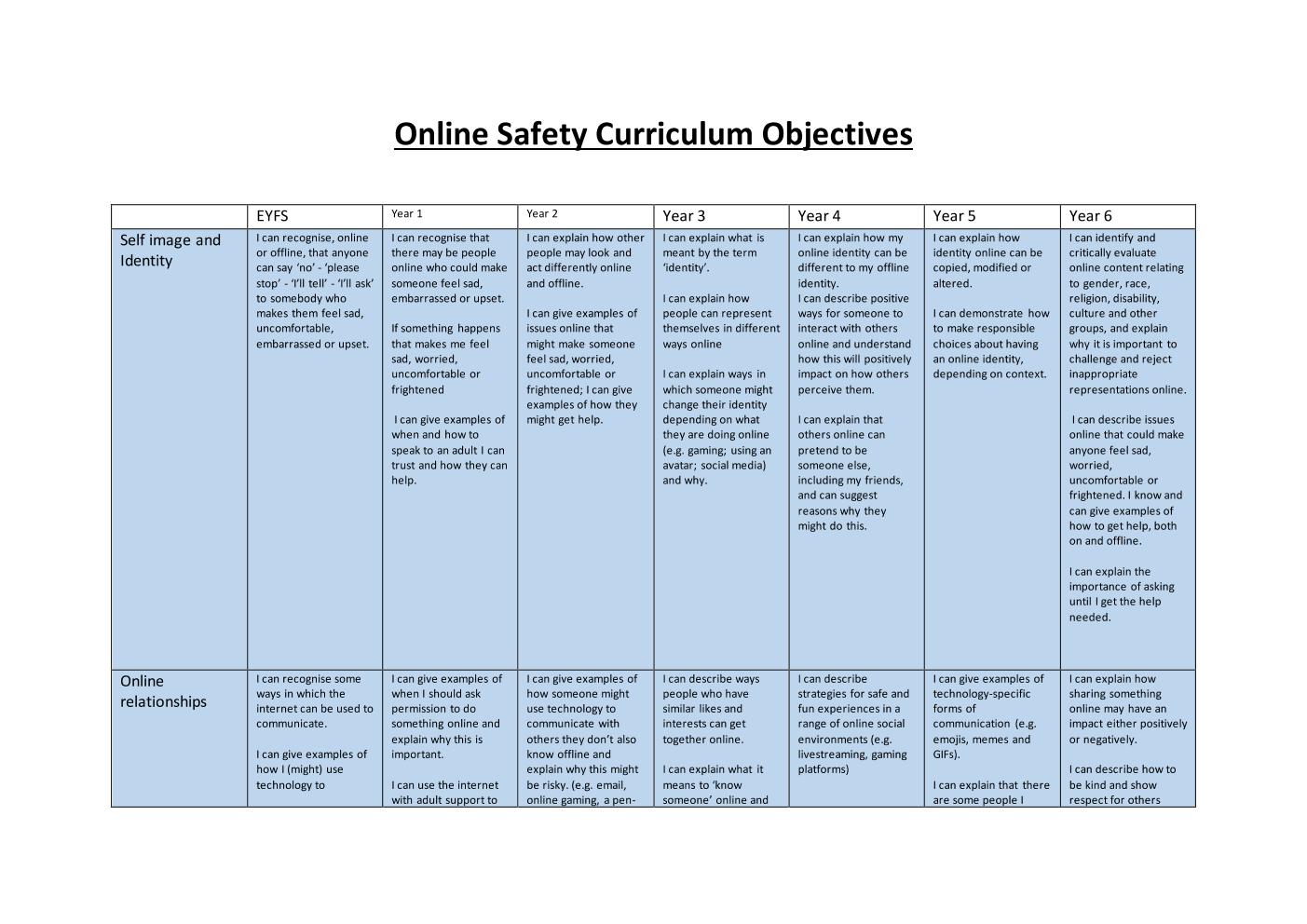
At St Anne’s we teach online safety through ‘ProjectEvolve’. The ProjectEVOLVE toolkit is based on the UKCIS framework “Education for a Connected World” (EFACW). This framework covers knowledge, skills, behaviours and attitudes across eight strands of our online lives. The eight strands are: self-image and identity, online reputation, online bullying, managing online information, health, wellbeing and lifestyle, privacy and security and copyright and ownership. Project evolve complements the PSHE/RSHE curriculum and further develops the statutory guidance for RSHE. These outcomes or competencies are mapped to age and progress. Each term teacher will cover 3 strands from the Project Evolve (2 strands in the summer term) We deliver lessons discretely to the children in blocks Autumn 1, Spring 1 and Summer 1 with objectives being taken from our online safety progression document below. Some lessons may include multiple objectives depending on children’s prior knowledge of a subject.
From year 1 to year 6 children will be assessed using a ‘check in’ and a ‘check out’ task termly. These tasks will take the form of an online questionnaire where children will answer multiple choice questions based around the objectives to be taught over the course of the term either individual from Year 2 upwards or collectively in EYFS and year 1. Teachers will assess children’s prior knowledge using this check in tasks and will use their judgement to decide which objectives need covering in more depth. At the end of each term the children will complete a check out task to measure the progress made. These check out scores will inform the teacher judgements for the overall computing curriculum. Over the course of the year the children will be assessed against the objectives (I can statements) listed in the progression document below. In EYFS children will be assessed on each strand of the evolve curriculum at the beginning of the year to identify gaps. The class teacher will then use this data to deliver a tailored curriculum for their cohort. Children will then be assessed again in the summer term using the check out task.
We believe online safety should include the whole of the school community. At St Anne’s we implement this by delivering workshops to parents and carers as well as producing a termly online safety newsletter that can be accessed through our school website. Throughout the year the children will engage in safer internet day and children’s mental health week during February, Anti-bullying week during November as well as mental health awareness week in May.
Online Safety Curriculum Overview
Children follow a stand-alone curriculum for online safety. This is delivered through project evolve and covers the strands of:
- Self-image and identity
- Online relationships
- Online reputation
- Online bullying
- Managing online information
- Health, wellbeing and lifestyle
- Privacy and security
- Copyright and ownership
Children in EYFS and KS1 receive an online safety lesson once every 2 weeks for the entirety of the year. Children in KS2 receive a lesson once a week during Autumn 1, Spring 1 and Summer 2.
On-going assessment based on observation; discussion; questioning; written work and end of unit tasks. These will all be collated by the Technola teacher and recorded on the Technola portal. Computing topic questions will be included in the ‘Big Fat Quiz of the Week’ to maintain cognitive recall of historical facts learnt in prior years. At the end of a unit of work, the teacher in conjunction with the computing teacher makes a summary judgement about the work of each pupil if they have yet to obtain, met or exceeded the unit objectives. This data is then recorded on insight. We use this as a basis for assessing the progress of the child at the end of the year.
All children from EYFS, KS1 and KS2 take part in a check in and check out task for online safety. These tasks involve discussion points based on objectives from the topics to be taught or topic that has been taught. The class then receive a class overview showing how each discussion point was answered using the ratings:
- Incorrect
- Don’t know
- Emerging
- Developing
- Secure
The checking in tasks are used to gain an understanding of what children already know and what objectives need to be focused on during online safety lessons for that topic. Check out tasks are used to measure the progress of the class.
Online Safety Curriculum Overview
|
|
Autumn 1 |
Autumn 2 |
Spring 1 |
Spring 2 |
Summer 1 |
Summer 2 |
|
Nursery |
Self-image and identity Online relationships Online reputation |
Online Bullying Managing online information Health, wellbeing and lifestyle |
Privacy and security Copyright and ownership |
|||
|
Reception |
Self-image and identity Online relationships Online reputation |
Online Bullying Managing online information Health, wellbeing and lifestyle |
Privacy and security Copyright and ownership |
|||
|
Year 1 |
Self-image and identity Online relationships Online reputation |
Online Bullying Managing online information Health, wellbeing and lifestyle |
Privacy and security Copyright and ownership |
|||
|
Year 2 |
Self-image and identity Online relationships Online reputation |
Online Bullying Managing online information Health, wellbeing and lifestyle |
Privacy and security Copyright and ownership |
|||
|
Year 3 |
Self-image and identity Online relationships Online reputation |
|
Online Bullying Managing online information Health, wellbeing and lifestyle |
|
Privacy and security Copyright and ownership |
|
|
Year 4 |
Self-image and identity Online relationships Online reputation |
|
Online Bullying Managing online information Health, wellbeing and lifestyle |
|
Privacy and security Copyright and ownership |
|
|
Year 5 |
Self-image and identity Online relationships Online reputation |
|
Online Bullying Managing online information Health, wellbeing and lifestyle |
|
Privacy and security Copyright and ownership |
|
|
Year 6 |
Self-image and identity Online relationships Online reputation |
|
Online Bullying Managing online information Health, wellbeing and lifestyle |
|
Privacy and security Copyright and ownership |
|
Online Safety Curriculum Objectives
Please select the document below.

|
Online Safety Curriculum Objectives | [pdf 138KB] |

|
E-Safety Curriculum
Please click the link below to access the content of the National Curriculum by subject and by year group.
|
Teaching Online Safety in Schools |

E-Safety Learning Resources
|
KS1 E-Safety Resources |
|
KS2 E-Safety Resources |
|
E-Safety for Parents |